Author: Matillion
Date Posted: May 28, 2026
Last Modified: Jun 4, 2026
Incremental load for Salesforce and JDBC sources
Incrementally load data from Salesforce and JDBC sources. Migrated from the Matillion ETL incremental load shared jobs.
On Matillion ETL, shared jobs were available for Salesforce Incremental Load and JDBC Incremental Load. To simplify migration to Maia Foundation, this project provides drop-in replacements published as shared pipelines.
Once set up, these shared pipelines can be consumed from any project in your account — just like the original METL shared jobs.
Setup Instructions
1. Create a new project
We recommend a dedicated project to keep the shared pipeline source separate from your working pipelines. Use the name:
Maia Incremental Load - Snowflake
This name forms part of the shared pipeline identifier that consumers will see (see Usage below), so choosing a consistent name avoids confusion.
2. Import from the Matillion Exchange
- Open a branch on your project.
- Click “Add > Browse Exchange”
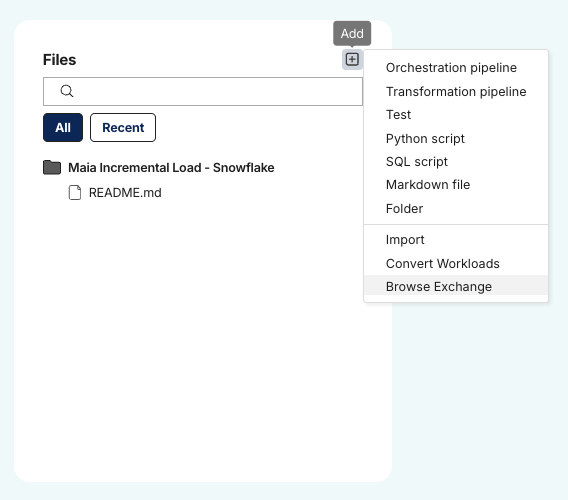
- Search for “Incremental load for Salesforce and JDBC sources” and click the tile to import it into your project.
- You should now have a folder named “Imported from Exchange > Incremental load” containing the latest versions of these pipelines.
3. Create the .matillion folder
If your project doesn’t already have a .matillion folder in the root, create one.
4. Add the shared pipelines configuration
Copy the file:
Imported from Exchange/Incremental load/shared-pipelines.yaml
into the .matillion folder so it exists at:
.matillion/shared-pipelines.yaml
Already have a
.matillion/shared-pipelines.yaml?Instead of overwriting it, merge the pipeline entries from the provided
shared-pipelines.yamlinto your existing file’spipelines:list.
5. Commit your changes
Commit all changes to the project branch.
6. Push with shared pipelines enabled
Push the branch and ensure both of the following options are ticked:
- ✅ Publish
- ✅ Include shared pipelines
This publishes the shared pipelines to your account.
Migrating METL Pipelines That Use These Shared Jobs
When importing METL pipelines that contain references to the original shared jobs, the import process needs a JSON mapping file to translate shared job parameters into the shared pipeline format.
Provide the appropriate mapping file when prompted during the METL pipeline import:
| Original METL Shared Job | Mapping File |
|---|---|
| Salesforce Incremental Load (rev.5) | Imported from Exchange/Incremental load/Salesforce/shared-job-mapping.json |
| JDBC Incremental Load (rev.5) | Imported from Exchange/Incremental load/JDBC/shared-job-mapping.json |
Note: The mapping file contains the project name (
Maia Incremental Load - Snowflake) in thepipelineNamefield. If you used a different project name in step 1, update thepipelineNamevalue in the JSON to match:"pipelineName": "Your Project Name#Salesforce-Incremental-Load" "pipelineName": "Your Project Name#JDBC-Incremental-Load"
Known Limitations
⚠️ Encryption parameters — The Encryption and KMS Key ID parameters exist for backwards compatibility with migrating pipelines, but are no longer implemented. Encryption types of None and SSE S3 will continue to work automatically, but SSE KMS is not currently supported on Maia Foundation.
⚠️ MATILLION_BATCH_ID — The
MATILLION_BATCH_IDcolumn on target tables will be hard-coded to zero on all rows updated by the shared pipelines.
⚠️ JDBC driver compatibility — The JDBC shared pipeline works seamlessly with drivers bundled in the Maia runner (including PostgreSQL, MariaDB, Oracle, Microsoft SQL Server, Amazon Redshift, and others). If you are using a custom/external driver uploaded to your runner, be aware of the following differences:
- The Connection Options grid variable is currently unsupported for external drivers
- Schema drift logic will widen text columns to
VARCHAR(16777216)regardless of their original size- Schema drift logic will widen integer columns to
NUMBER(38, 0)regardless of their original precision- Other data type mappings may differ depending on the driver
MySQL users: The MySQL JDBC driver is not bundled with the Maia runner. If you previously used MySQL on METL, you can either upload the MySQL driver as an external driver (subject to the limitations above), or switch the Database Type to MariaDB — the included MariaDB driver is compatible with MySQL databases and avoids these limitations.
Usage
Once published, the shared pipelines are available from any project in the same account. Add a Run Shared Pipeline component to your orchestration pipelines and select one of:
| Shared Pipeline | Identifier |
|---|---|
| Salesforce Incremental Load | Maia Incremental Load - Snowflake#Salesforce-Incremental-Load |
| JDBC Incremental Load | Maia Incremental Load - Snowflake#JDBC-Incremental-Load |
The identifier is formed as <project name>#<id>, where the id is defined in shared-pipelines.yaml. If you used a different project name in step 1, the prefix will reflect that instead.
Configure the pipeline parameters (OAuth credential, target database/schema, staging settings, source list, etc.) as documented in the shared pipeline’s parameter descriptions.
Downloads
Licensed under: Matillion Free Subscription License
- Download maia_incremental_load_snowflake_20260604.zip
- Target: Snowflake